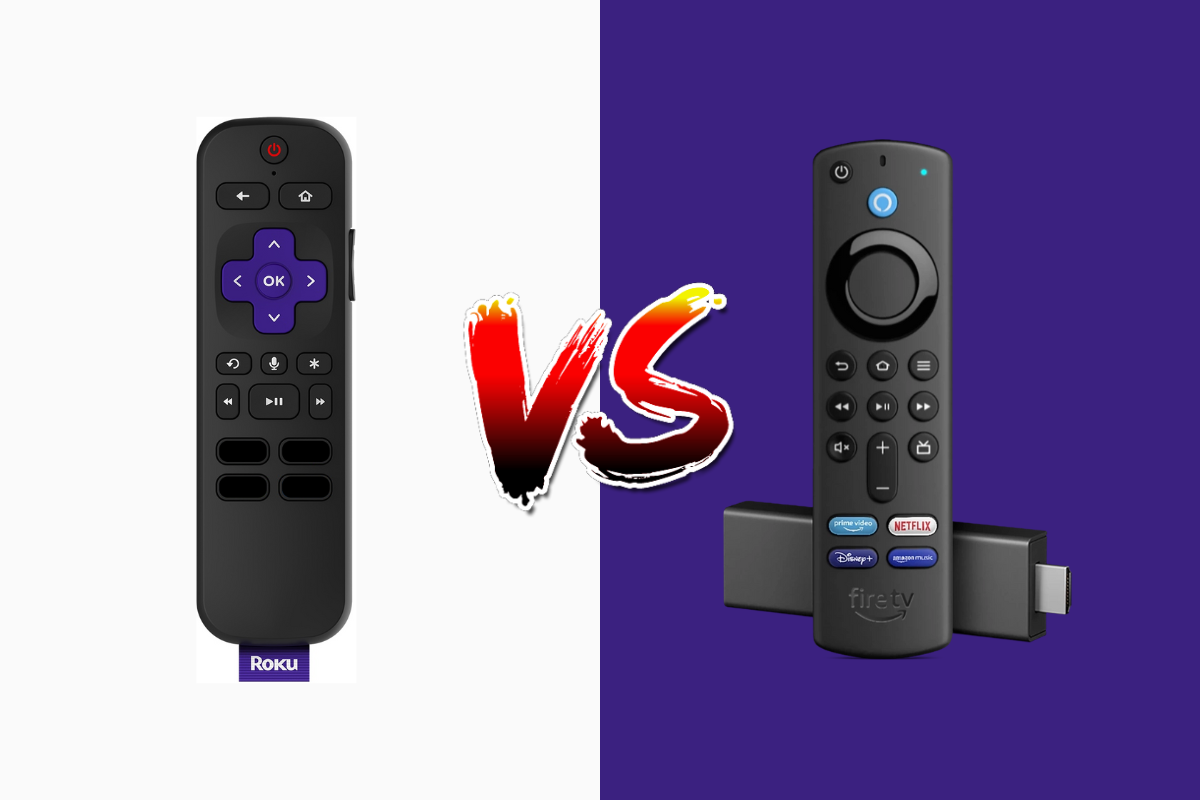
Choosing the right streaming device can feel overwhelming, especially when you’re trying to decide between two industry giants: Amazon’s Firestick and Roku. Both devices promise to transform your television into a smart entertainment hub, but which one truly delivers the best value for streaming IPTV content? Whether you’re a cord-cutter looking to save money, a tech enthusiast seeking the latest features, or someone simply wanting reliable access to your favorite shows, this comprehensive comparison will help you make an informed decision. We’ll examine pricing structures, feature sets, performance metrics, and how each device handles IPTV services to determine which streaming solution deserves a place in your living room.
- Amazon Firestick offers deeper integration with Alexa and more sideloading flexibility for IPTV applications, while Roku provides a more neutral, user-friendly interface with broader app compatibility
- Pricing varies significantly: Firestick models range from $29.99 to $139.99, while Roku devices span $24.99 to $99.99, with mid-range options offering the best value for IPTV streaming
- Firestick excels in customization and IPTV player installation, making it ideal for users who want control over their streaming experience
- Roku delivers superior search functionality across multiple platforms and maintains stricter content standards, which may limit some IPTV box applications
- Performance differences are minimal in 4K models, but Firestick 4K Max edges ahead with Wi-Fi 6 support and more powerful processing capabilities
Understanding the IPTV Firestick Advantage: Price Breakdown and Value Proposition
When evaluating streaming devices for IPTV service delivery, price becomes a critical factor for most consumers. Amazon’s Firestick lineup offers four main options, each targeting different budget points and use cases. The entry-level Fire TV Stick Lite retails at $29.99, providing basic 1080p streaming with Alexa voice remote functionality. For an additional $10, the standard Fire TV Stick delivers the same resolution with enhanced remote features and slightly better processing power.
The Fire TV Stick 4K represents the sweet spot for serious streamers at $49.99, offering Ultra HD resolution, HDR support, and Dolby Atmos audio capabilities. For users who demand cutting-edge technology, the Fire TV Stick 4K Max ($54.99) includes Wi-Fi 6 support, faster processing, and live picture-in-picture functionality. At the premium end sits the Fire TV Cube at $139.99, combining streaming capabilities with hands-free Alexa control and smart home hub functionality.
Roku’s pricing strategy follows a similar tiered approach but typically undercuts Amazon slightly. The Roku Express starts at just $24.99 for basic HD streaming, while the Roku Express 4K+ offers 4K capabilities at $39.99. The Roku Streaming Stick 4K ($49.99) competes directly with Firestick’s 4K offering, featuring Dolby Vision support and long-range wireless connectivity. The premium Roku Ultra ($99.99) includes ethernet connectivity, USB playback, and an enhanced voice remote with rechargeable batteries and headphone jack for private listening.
Hidden Costs and Long-Term Value Considerations
Beyond the initial purchase price, understanding the total cost of ownership matters significantly. Neither device requires subscription fees for basic functionality, but both heavily promote their respective ecosystems. Amazon Prime members gain additional value from their Firestick through seamless integration with Prime Video, exclusive content, and rental discounts. Roku maintains platform neutrality, which means no preferential treatment for any single streaming service—a double-edged sword depending on your existing subscriptions.
For IPTV users specifically, Firestick’s ability to sideload applications without complicated workarounds represents substantial hidden value. If you’re planning to install IPTV Smarters Pro on your Amazon Firestick 4K, the process is straightforward and well-documented. Roku’s closed ecosystem makes installing unauthorized applications more challenging, though legitimate IPTV players like IPTV Smarters are available through workarounds.
Feature Comparison: IPTV Box Capabilities and Streaming Functionality
When comparing these devices as IPTV box solutions, feature differentiation becomes crucial. Amazon’s Fire OS (a modified Android fork) provides inherent advantages for IPTV enthusiasts. The platform supports APK installation through third-party downloaders, enabling access to a vast library of IPTV player applications not officially available in the Amazon Appstore. This flexibility proves invaluable for users who want to install SET IPTV on their Amazon Firestick 4K or experiment with multiple streaming solutions.
Voice control implementation differs significantly between platforms. Alexa integration on Firestick offers robust smart home control, natural language processing, and the ability to search across multiple apps simultaneously. However, Roku’s voice search arguably delivers more comprehensive results across streaming platforms, including content availability and pricing comparisons from multiple services. According to Consumer Reports’ streaming device testing, Roku’s universal search functionality outperforms competitors in finding specific content across platforms.
The user interface philosophy represents another fundamental difference. Firestick’s home screen prioritizes Amazon content and recommendations, which some users find intrusive but others appreciate for content discovery. Advertising is prominent, with sponsored content occupying prime screen real estate. Roku’s interface takes a more democratic approach, featuring a customizable home screen where users can arrange channels according to preference. Neither platform is ad-free, but Roku’s advertising feels less aggressive and more respectfully integrated.
IPTV Player Compatibility and Installation Options
For viewers specifically interested in IPTV streaming, application availability becomes paramount. Firestick’s Android foundation means compatibility with virtually every major IPTV player, including GSE Smart IPTV, TiviMate, Perfect Player, and numerous others. Installation methods range from official app store downloads to sideloading via Downloader or FileLinked applications. This flexibility empowers users to choose the exact IPTV player that matches their preferences and technical requirements.
Roku’s approach centers on officially sanctioned channels, which limits but doesn’t eliminate IPTV options. While you can install IPTV Smarters Player on Roku through screen mirroring and casting methods, the process lacks the native integration Firestick users enjoy. Some legitimate IPTV service providers offer dedicated Roku channels, but the selection remains narrower compared to Android-based alternatives. Roku’s official support documentation emphasizes their curated approach to content distribution, prioritizing security and content legitimacy over unrestricted access.
Performance Showdown: IPTV Roku vs Firestick Speed and Reliability
Raw performance metrics reveal interesting distinctions between comparable models. The Firestick 4K Max utilizes a quad-core 1.8 GHz processor with 2GB RAM, while Roku Streaming Stick 4K features a quad-core processor with 1GB RAM. In practical usage, both devices handle 4K streaming without significant buffering on quality internet connections. However, Firestick’s additional RAM provides smoother multitasking when switching between applications or running background processes—particularly relevant when streaming IPTV content while downloading guide data or updating playlists.
Wi-Fi connectivity represents a critical performance factor often overlooked in device comparisons. The Firestick 4K Max’s Wi-Fi 6 (802.11ax) support future-proofs your investment and delivers tangible benefits in congested wireless environments. Testing by TechHive demonstrated up to 40% faster loading times when connected to Wi-Fi 6 routers. Roku’s Streaming Stick 4K uses Wi-Fi 5 (802.11ac) with dual-band support, which proves adequate for most streaming scenarios but lacks the cutting-edge wireless technology that future-proofs your setup.
Real-world IPTV streaming performance depends on multiple variables beyond device specifications. Network stability, IPTV service quality, and chosen IPTV player all influence the viewing experience. In testing scenarios with identical network conditions and IPTV sources, both devices delivered comparable performance for standard definition and HD content. 4K IPTV streaming with HDR occasionally showed minor advantages for Firestick 4K Max, likely attributable to superior processing power and wireless connectivity.
Storage Capacity and Expandability for IPTV TV Applications
Internal storage limitations affect both platforms differently. Firestick models include 8GB of internal storage, with approximately 5-6GB available for applications and data after system files. While this sounds restrictive, IPTV applications typically consume minimal space compared to games or large streaming apps. However, users who install multiple IPTV players, downloaders, and utilities may encounter storage warnings. Unfortunately, Firestick doesn’t support external storage expansion for app installation, though you can attach USB drives to Fire TV Cube for media playback.
Roku devices similarly limit internal storage to 8GB across most models, with the Roku Ultra offering the same capacity despite its premium positioning. The platform’s cloud-based architecture minimizes local storage requirements, as channel installations are typically smaller than Android APK files. For dedicated IPTV streaming, neither device’s storage limitations should present significant obstacles, but power users who want extensive app libraries might feel constrained.
IPTV Service Integration: Streaming Quality and Channel Management
How each device handles IPTV service integration reveals important practical differences. Firestick’s open architecture allows direct installation of IPTV players configured with your service credentials. This means launching your IPTV player delivers immediate access to your channel lineup without additional steps. The experience mirrors traditional cable or satellite television, with EPG (Electronic Program Guide) functionality, favorites management, and catch-up features all operating seamlessly within the dedicated application.
Roku users face additional configuration steps depending on their chosen method. Screen mirroring from mobile devices works reliably but introduces latency and consumes battery on your smartphone or tablet. The casting approach maintains connection requirements between devices, meaning your phone or tablet must remain powered and connected throughout viewing. While some official IPTV channels exist in Roku’s store, many popular IPTV service providers lack native Roku applications, forcing reliance on workarounds that compromise the user experience.
For households considering multiple device types, it’s worth noting that quality IPTV services support various platforms. If you’re exploring options beyond Firestick and Roku, you might investigate how to install IPTV Smarters Pro on Samsung TV or explore IPTV solutions for Google Chromecast and Google TV. Platform diversity ensures you’re not locked into a single ecosystem and can choose devices based on specific room requirements or budget constraints.
Remote Control and User Experience: Daily Interaction Quality
The remote control represents your primary interface with streaming devices, yet it’s frequently undervalued in comparison articles. Firestick’s Alexa Voice Remote features a minimalist button layout with dedicated power and volume controls for your television. The voice button activates Alexa for hands-free search, smart home control, and content discovery. Build quality feels solid but not premium, with responsive buttons and intuitive placement. If you encounter issues, our guide on Firestick remote troubleshooting provides comprehensive solutions.
Roku’s remote design varies across models, with the premium Roku Ultra offering the most feature-rich option. All Roku remotes include the signature lost remote finder—press a button on your Roku device, and the remote emits an audible beep. This seemingly simple feature proves invaluable in daily use. The rechargeable remote with private listening on Roku Ultra represents a genuine quality-of-life improvement, eliminating battery replacements and providing wireless headphone functionality through the remote’s 3.5mm jack.
Navigation Efficiency and Content Discovery
Navigation speed and logic significantly impact daily satisfaction with streaming devices. Firestick’s interface responds quickly on 4K models but shows occasional lag on entry-level devices when navigating heavy content sections. The home screen’s content-forward design means you’re constantly exposed to recommendations, which helps discovery but can slow direct access to specific apps. Power users typically pin frequently used applications to the top row for faster access.
Roku’s grid-based home screen prioritizes apps over content, delivering faster access to your preferred streaming services. The interface feels snappier with less animation and fewer visual flourishes. For IPTV-focused users, this streamlined approach means fewer clicks between powering on and launching your IPTV player. However, Roku’s content discovery features feel less sophisticated than Amazon’s algorithm-driven recommendations, which may matter if you value platform suggestions for new content.
Ecosystem Lock-In and Platform Flexibility
Considering ecosystem implications prevents future regret as your streaming setup evolves. Amazon’s aggressive integration with its services creates convenience for Prime members but represents vendor lock-in. Your viewing history, recommendations, and even search results prioritize Amazon’s content and purchasing options. For users heavily invested in Amazon’s ecosystem with Prime membership, Echo devices, and Amazon services, this integration provides seamless experiences across devices.
Roku’s platform-agnostic approach appeals to users who value independence from single-vendor ecosystems. The company generates revenue through advertising and revenue-sharing agreements rather than content sales, which theoretically reduces conflicts of interest in content recommendations. According to Roku’s corporate positioning, this neutral stance benefits consumers by providing unbiased access to streaming services. In practice, this means search results show content availability and pricing across multiple platforms without favoring specific providers.
Security and Privacy Considerations for IPTV Streaming
Security consciousness matters increasingly in connected home environments. Both devices collect usage data, viewing habits, and search queries to improve recommendations and target advertising. Amazon’s privacy policy, available through your device settings, provides granular controls over data collection and personalized advertising. You can disable interest-based ads and limit data sharing, though doing so may reduce recommendation accuracy.
Roku similarly collects viewing data and provides privacy controls through settings menus. The company’s privacy policy outlines data collection practices and user rights. For IPTV users, neither device monitors the content of your streams—they track application usage but not what you watch within third-party IPTV players. However, using VPN applications adds privacy layers by encrypting traffic and masking your IP address, which many IPTV users consider essential for protecting their streaming activities.
Future-Proofing and Long-Term Support
Longevity considerations influence which device offers better long-term value. Amazon’s track record shows approximately 4-5 years of active support for Fire TV devices, with software updates gradually slowing before eventual discontinuation. Older models like the 2nd generation Firestick still function but receive fewer updates and increasingly struggle with modern applications’ resource requirements. The rapid pace of Fire TV model releases—often annually—suggests relatively short product lifecycles focused on encouraging upgrades.
Roku demonstrates slightly longer support windows, with some devices receiving updates 5-6 years after release. The company’s slower release cadence and focus on perfecting existing platforms rather than constant hardware iteration benefits long-term device owners. However, neither platform guarantees indefinite support, and both eventually sunset older models by discontinuing updates and removing devices from active support lists.
Frequently Asked Questions (FAQ)
Q: Can I use both Firestick and Roku for IPTV streaming?
A: Absolutely. Both devices support IPTV streaming, though Firestick offers easier installation of third-party IPTV players through sideloading. Roku requires screen mirroring or official channel installations, which may limit player options but still delivers quality IPTV viewing experiences.
Q: Which device is better for beginners who want to watch IPTV?
A: Roku provides a more straightforward, user-friendly experience with simpler setup and intuitive navigation. However, if you’re comfortable following installation guides, Firestick offers more flexibility and direct IPTV player integration that may ultimately prove easier for dedicated IPTV viewing.
Q: Do Firestick and Roku support 4K IPTV streaming?
A: Yes, both devices’ 4K models (Firestick 4K/4K Max and Roku Streaming Stick 4K/Ultra) fully support 4K resolution streaming. Performance depends primarily on your internet connection speed and IPTV service quality rather than device limitations. Both handle 4K IPTV content smoothly with adequate bandwidth.
Q: Can I control Firestick or Roku without the remote?
A: Both platforms offer smartphone apps for remote control functionality. The Amazon Fire TV app and Roku mobile app (iOS and Android) provide full remote capabilities including voice search, keyboard input, and navigation. Additionally, Firestick supports Alexa voice commands through Echo devices, while Roku offers similar functionality through Google Assistant and Alexa integrations.
Conclusion
Choosing between Firestick and Roku ultimately depends on your specific priorities and use cases. For IPTV enthusiasts who value customization, sideloading flexibility, and direct application control, Firestick represents the superior choice—particularly the 4K Max model with its enhanced processing power and Wi-Fi 6 connectivity. The device’s Android foundation provides unrestricted access to IPTV players and applications, creating a versatile streaming hub that adapts to your exact requirements.
Conversely, Roku excels for users who prioritize simplicity, platform neutrality, and intuitive interfaces over advanced customization. The device’s user-friendly design, superior universal search, and generally lower entry prices make it attractive for straightforward streaming needs. However, IPTV users should carefully consider the platform’s limitations regarding third-party application installation before committing.
Both devices deliver reliable 4K streaming performance at comparable price points, with minimal practical differences in video quality or buffering on quality internet connections. Your decision should weigh ecosystem preferences, existing subscriptions, technical comfort level, and specific IPTV requirements. Neither choice is objectively wrong—they simply serve different user profiles and priorities within the streaming landscape.
Ready to experience premium IPTV streaming on your preferred device? Whether you choose Firestick or Roku, a quality IPTV service makes all the difference. Start your IPTV Free Trial today and discover why thousands of users trust our platform for reliable, high-quality streaming across all devices.